Choose the documents and questions.
Scope a review to folders, selected files or filters. Define the fields in plain English and reuse saved column templates.
AI ROOM / BUY-SIDE DUE DILIGENCE
Your deal risk runs across workstreams. Your diligence should too.
The AI-native buy-side data room, seamlessly embedded in CorpDev.Ai. Preserve source pages and extract content into Markdown—including financial tables—then put the evidence to work with the AI Analyst, financial models and Digital Twins.
AI ROOM IN ACTION
Follow the work inside CorpDev.Ai: upload, inspect, search, investigate—and understand the business you intend to buy.
 ↑ Uploading… ↑ Uploading… ↑ Uploading… ↑ Uploading…
 4 files


Bring the folder structure and source documents into the room.
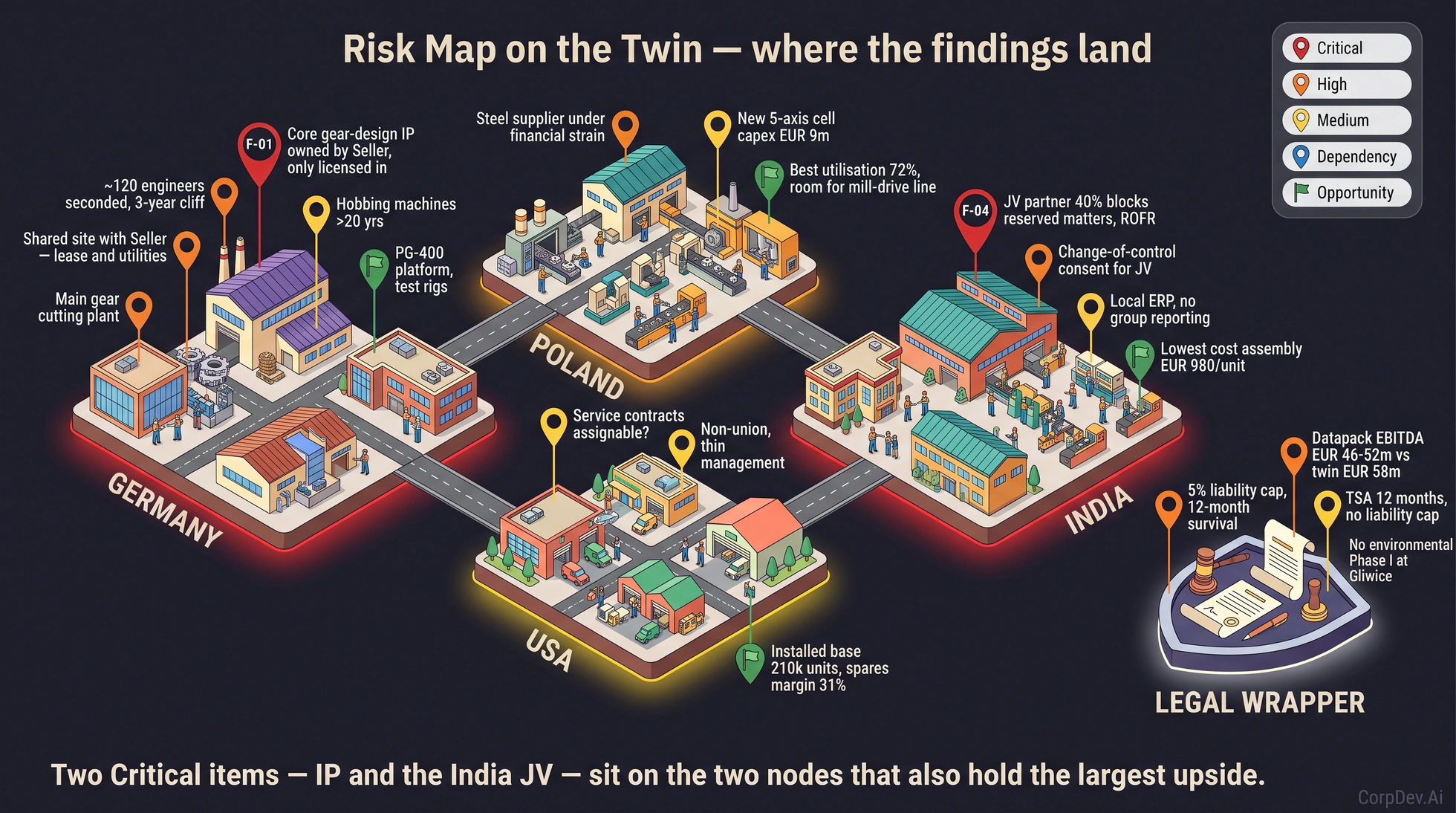
Current product screens captured September 12, 2026. Upload and RAG search are animated demonstrations; search snippets are illustrative source excerpts. Processing time is accelerated. The Digital Twin shows a separate illustrative industrial case.
THE EVIDENCE BEHIND THE ANSWER
See what the document says and what the AI read, side by side. Follow the analysis back to its source.
Keep the layout, tables and footnotes available for inspection alongside the extracted content.
Search the content, examine the evidence and use it in the next diligence question.
Current product screen · September 12, 2026. Open at full size to inspect the document and extraction.
BUILT FOR THE DETAIL THAT MATTERS
Diligence needs the content behind the headline: the period, the units, the exceptions and the terms that change the interpretation.
Paginated documents become stored raster page images—a permanent visual source record alongside the file, available throughout the diligence process.
Vision AI reads narrative, financial tables, headings and footnotes into Markdown, preserving the structure needed for DD-grade review.
Search by meaning. Give the Analyst a file, a folder or the whole AI Room. Investigate relationships across the materials and develop the diligence output.
PDFs, presentations, Word documents and scans use page-based visual extraction. Excel workbooks extract as structured data tables; text and Markdown remain directly readable. Processing status makes failed or incomplete extraction visible.
CROSS-STREAM DUE DILIGENCE
Direct the Analyst to connect financial, commercial, legal, tax, people and technology evidence around the question that changes your investment decision.
One question. Four workstreams. A conclusion that needs all of them.
Example workflow · not a customer findingEstablish the customer's contribution, period and concentration.
Check renewal timing, account health and the growth assumption.
Inspect consent, termination and change-of-control provisions.
Assess whether integration changes the service the customer buys.
A revenue-at-risk assessment, a financial-model sensitivity, an explicit evidence gap and the implication for valuation or deal terms.
Develop with the Analyst. Review with the deal team.INTRODUCING REVIEW
Review turns a set of documents into a structured answer table. Put your questions in columns, your documents in rows, and examine the evidence behind each cell.
Scope a review to folders, selected files or filters. Define the fields in plain English and reuse saved column templates.
Review renewal dates, consent requirements, financial terms or other diligence questions consistently across the document set.
Open an answer to inspect its quote, page and reasoning. Correct values, verify findings and re-extract when needed.
Export the full review to Excel, CSV or JSON. Carry the findings into the Analyst's cross-stream work and your team's diligence deliverables.
Review is enabled per workspace. Ask our team to include it in your AI Room walkthrough.
SEAMLESSLY EMBEDDED IN CORPDEV.AI
AI Room connects directly to CorpDev.Ai's analytical capabilities. Your Analyst works from the room's evidence to investigate the deal, model its economics and understand the business as a whole.
Documents, preserved page images, extracted Markdown and structured financial tables.
Perform cross-stream DD. Compare the financial story with contracts, customer evidence and operational constraints. Develop findings and follow-up questions.
Explore the Analyst ↗Build financial models from the evidence. Translate diligence findings into revenue assumptions, cost drivers, valuation scenarios and sensitivities.
Explore analytical deliverables ↗Use a connected model of customers, contracts, people, systems and operations to understand how the pieces fit together—and where a change affects the rest.
Explore Digital Twins ↗FROM THE ROOM TO THE REVIEW
Use AI Room with the CorpDev.Ai Analyst and workbook to develop the DD plan, focus areas, requests and workstream findings in the same workspace.
Bulk-upload folders, browse the index, search file contents and track which documents are AI Ready.
Develop priorities across workstreams, challenge the acquisition thesis and turn open questions into targeted requests.
PORTABLE EXTRACTION SKILL · AVAILABLE ON REQUEST
The DD-grade vision extraction capability is also available on request as a portable skill for OpenAI and Anthropic agents: Python code paired with natural-language instructions for rendering pages, extracting structured Markdown and reviewing the result against the source.
The integrated CorpDev.Ai experience connects that evidence to the Analyst, financial models and Digital Twins. The portable skill brings extraction into your own agent workflows.
Request the Extraction Skill ↗BEFORE YOU BRING THE ROOM
Yes. Upload documents you are authorized to download and use AI Room as your buy-side analysis workspace. Folder uploads preserve the folder structure. AI Room does not require the seller to change its process.
For paginated documents, AI Room stores rendered page images with the extracted content so your team can return to the visual source. This is a retained record within the room, not a promise of immutable or indefinite archival storage; deleting a file removes it. Spreadsheets are handled as structured tables.
Inspect the original page beside its extraction, including tables and footnotes. Use processing status to identify incomplete or failed files, and retry failed processing. DD-grade work depends on verifiable evidence and reviewer judgment; an AI Ready badge indicates completed extraction, not an accuracy certification.
Search content by meaning and work with selected files, folders or the whole AI Room. Ask it to compare sources, investigate a diligence question and develop the findings in a workbook. You direct the scope and review the conclusions.
Review applies the same questions across a set of source documents. Each document is a row, each question is a column, and each answer can carry its supporting quote and page. Inspect the evidence, edit or verify answers, and export to Excel, CSV or JSON. Availability is enabled per workspace.
Review workspace access, document handling and your transaction's requirements with our team before onboarding the deal. Explore security and the vendor-review process →
BRING THE QUESTION THAT COULD CHANGE THE DEAL
Walk through source-page fidelity, financial-table extraction and a cross-stream diligence question with our team.